Category: News
LabraNet Account Status Issue
Notification Emails Sent in Error
We’re currently investigating an issue affecting LabraNet accounts where users have been incorrectly marked as inactive. This triggers an automated email stating that the account will be disabled in two weeks. Your account will continue to function normally while we resolve the problem.
Update
We’ve identified and resolved the issue that caused LabraNet accounts to be incorrectly flagged as inactive. This error triggered automated emails warning of upcoming account deactivation, which understandably caused concern.
After thorough investigation, we can confirm that no user accounts were actually disabled as a result of this issue. All affected accounts continued to function normally throughout.
We are implementing safeguards to prevent similar mislabeling in the future, including improved validation checks and alert thresholds.
We appreciate your patience and understanding while we worked to resolve this. If you have any lingering concerns, please contact LabraNet administration via LabraNet helpdesk
Maintenance Notice: LabraNet VPN Service
Please be advised that the LabraNet VPN service will experience outages on Wednesday, 25 February, due to scheduled configuration changes. The service will be completely unavailable at times between 8:00 and 16:00, and existing VPN connections may drop multiple times during this window.
As part of the update, L2TP support will be discontinued in favor of IKEv2. SSTP connections will not be affected.
We recommend planning your work accordingly. Thank you for your understanding.
Postgresql update
Our postgresql server has been updated from version 13 to version 16. Client utilities and shared libraries on student-server have been updated also. Most operations should be backwards compatible but please check release notes of the new version in case you run into problems.
Regarding Gitlab updates
Gitlab will be updated to v17 for the upcoming semester during August. As this is a major update, UI changes and changes in operation are expected. For a full list of major changes/breakages, see the official Gitlab release notes for v17
Subsequent updates to minor versions of 17.x will follow on quiet times during semester. Since the upstream policy of Gitlab maintainers is to support only three newest releases, we will try to keep up with this cycle and stay on [newest-1] as the newest release almost always breaks functionality.
Patches and vulnerability updates are done during office hours on thursdays or fridays, depending on upstream releases. This will usually take less than half an hour and you can see if updates are in progress from the maintenance banner in the Gitlab UI. When update window is active Gitlab is in read-only mode, making sure no data is lost during updates. Keeping personal backups is still highly recommended.
Help us enhance Gitlab security
We highly recommend all our Gitlab users to enable two-factor authentication on their account. It is a very easy and efficient way to secure project data and takes only a few steps to complete:
Go to your profile in Gitlab and under Account, click “Enable two-factor authentication”
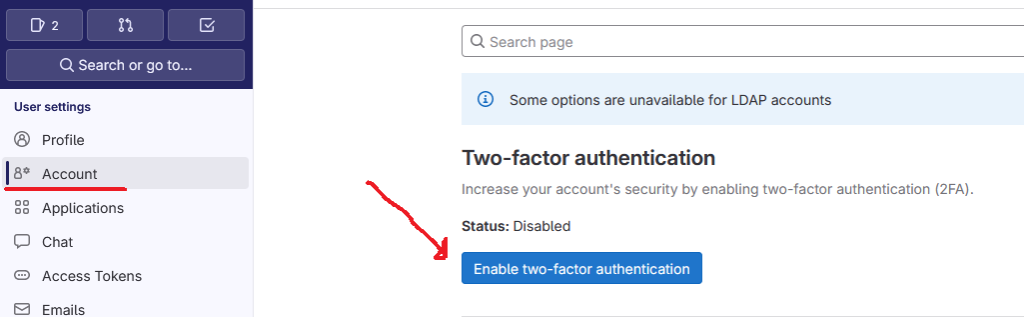
From there add your preferred two-factor authentication app such as Google Duo, Yubikey, Microsoft Authenticator or any other compatible application. Gitlab supports both TOTP and WebAuthn methods for two-factor authentication and you can have multiple methods enabled.
Two-factor is (currently) optional, but as it is one of the most efficient method in preventing credential abuse we would like to see all our users help us in securing one of the most important tools we have in our study network.