Category: Failure
LabraNet Account Status Issue
Notification Emails Sent in Error
We’re currently investigating an issue affecting LabraNet accounts where users have been incorrectly marked as inactive. This triggers an automated email stating that the account will be disabled in two weeks. Your account will continue to function normally while we resolve the problem.
Update
We’ve identified and resolved the issue that caused LabraNet accounts to be incorrectly flagged as inactive. This error triggered automated emails warning of upcoming account deactivation, which understandably caused concern.
After thorough investigation, we can confirm that no user accounts were actually disabled as a result of this issue. All affected accounts continued to function normally throughout.
We are implementing safeguards to prevent similar mislabeling in the future, including improved validation checks and alert thresholds.
We appreciate your patience and understanding while we worked to resolve this. If you have any lingering concerns, please contact LabraNet administration via LabraNet helpdesk
Week 9 VPN issues in LabraNet
LabraNet administration is aware of a recent issue in LabraNet VPN after week 9 service migrations. Some Windows 10 clients disconnect immediately or soon after connecting to LabraNet VPN and reconnecting usually does not help. LabraNet administration is focused on fixing this issue but for now the following workaround seems to resolve this issue.
Configure your LabraNet VPN connection to use split tunneling with the help of LabraNet remote access guide. Be sure to configure the additional fix for DNS lookups while you are at it. More details available here https://student.labranet.jamk.fi/windows-10-and-labranet-vpn-issues/ and in LabraNet remote access guide available here https://student.labranet.jamk.fi/wp-content/uploads/2018/10/Remote_access_guide.pdf
//UPDATE Week 10
Rollback of VPN server for now, should work like before.
Windows 10 and further LabraNet VPN issues
It has come to LabraNet Administration’s knowledge that connecting to LabraNet VPN fails on Windows 10 1903 when the following applies.
– User has not saved credentials for the VPN connection AND
– Connection is initiated from the taskbar Network menu
Issue:
– VPN connection never actually asks for credentials / connects
Workaround:
– Save credentials for the VPN connection OR
– Use the VPN System app and initiate the connection from there OR
– Open cmd and issue the command rasphone which will open the old connection menu which lets you complete the connection
Presumably Microsoft will fix this at some point, but for now if this is an issue for you, please try the workarounds.
Internet connectivity issue
There’s an ongoing problem with our Internet connection on the operator end (a cable break between Jyväskylä and Tampere.). Issue started at 10.19.
UPDATE: The issue is still ongoing, but operator has provided a preliminary fix. Internet works normally for the moment. More information in JAMK Helpdesk: https://helpdesk.jamk.fi/
Missing programs and features on classroom machines
We have noticed numerous issues on the classroom workstations regarding Start menu and some applications. Common issues currently occurring are:
- Cannot see any programs on Start menu or Desktop
- Cannot use search features
- Cannot open Windows 10 native applications such as calculator
We are currently investigating these issues. In the meantime, one can use the Programs -shortcut on the desktop to access software:
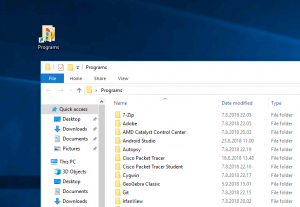
If even the Programs -shortcut is missing from the Desktop, software can be found in C:\Program Files or C:\Program Files (x86) -folders manually.
On new installations, waiting for a period of time (15 minutes) and signing out/in can help also.